
Noorul Huda N
DevRel Engineer
Sign up for a free account and get visibility in minutes
How SquaredUp’s unique Workspace and RollUp features combine to break down silos and speed up troubleshooting.
Having well-organized dashboards is just as important as having good dashboards.
But dashboard organization shouldn’t just make things easy to find. It should provide structure that supports collaboration and efficient troubleshooting. It has to be more than a basic folder system.
This post looks at how classic dashboarding tools handle organization today, where they fall short, and how SquaredUp Workspaces organize for visibility and shared context.
Conventional dashboarding tools give you folders, tags, and lists to organize dashboards. That helps with storage, but it doesn’t provide the context you need when something goes wrong.
They don’t show health or ownership, how components connect, or what’s affected when something fails.
Consider a common scenario in a traditional dashboarding setup:
Application teams see failing requests and slow response times.
Platform teams see infrastructure errors and resource metrics.
→ Each team is looking at valid data, but from isolated views.
What’s missing is the connection between the two — how the infrastructure issue is affecting the application, which services are impacted as a result, and how urgent the issue really is.
Without that shared context, teams struggle to collaborate effectively, even though everyone is responding to the problem.
To compensate, teams often create more and more dashboards to explain dependencies and impact. Over time, this leads to dashboard sprawl with dozens of dashboards spread across folders, each showing part of the story, but never the full picture.
Workspaces in SquaredUp take a different approach. A workspace isn't just a folder for dashboards, it represents a context — a team, a service, an application, a platform, a region, and so on. Workspaces are designed to reflect your organization and how it is structured.
Each workspace then encapsulates monitoring specific to that context:
Workspaces also come with ownership, health, and visibility built in. So when a failure occurs, the ambiguity disappears. The health is visible, the ownership is clear, and everyone's working from the same context.

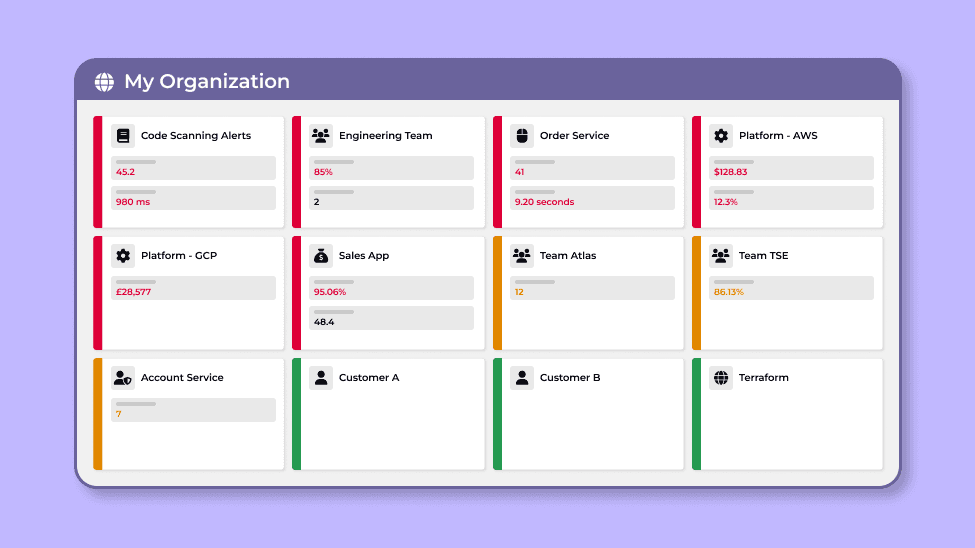
Workspaces combine with a feature called RollUp to convert your low-level monitoring into a high-level status view that management and operations teams can easily understand.
Say a monitor fails on one of your tiles. That failure doesn't just sit there, it ‘rolls up’ from the tile to the dashboard, and then to the workspace itself. So when you land on your organization home page, you're not just looking at a sea of alerts. You're looking at the health of every team, every service, every app, and all the monitors, KPIs, and data sources tied to that context.
Red, amber, green — you can see the state of everything at a glance.

Revisiting the troubleshooting scenario with Workspaces and RollUp
Application teams see failing requests and slow response times.
Platform teams see infrastructure errors and resource metrics.
→ Status rolls up to the organization view
The Application and Platform teams see the same picture at the same time — what is failing, what it is affecting, and how severe the impact is.
There are no silo-ed views. Shared context is built in, enabling teams to collaborate and resolve issues faster.

Each workspace in SquaredUp has a map. It's an interactive model of how things within that workspace connect and depend on each other. So if something goes wrong, you can see what it's affecting and what it depends on. This cross-silo visibility avoids the need to even form the ‘war room’ where dependencies are guessed and vital time is lost.
If you want to dive deeper into how maps work, you can read more in
A dive into health roll-up - SquaredUp.
Some silos exist for a reason, and it may not be necessary or appropriate for everyone to see the details. Workspaces act as a basis for access control and abstraction.
Workspace access control let you set permissions for viewer, editor, or full control – a team may have full control to modify dashboards and monitoring while dependent teams may only have viewer permissions.
Workspace status and KPIs allow you to surface key signals externally, abstracting the details into easy-to-consume signals for other teams.
Combined, your teams only see and work with what's relevant to them without losing shared context.

One of the most important benefits of workspaces is how they break down silos. When everything lives in one place — health, KPIs, data sources, maps — teams working on the same service or application are all looking at the same thing. And when something goes wrong, everyone can see the same reality.
That’s what “well organized” means with modern dashboards: organizing for visibility and shared context, not just folders.
DevRel Engineer