Noorul Huda N
DevRel Engineer
A server is down and an incident is open. Server health is in SCOM, the ticket is in ServiceNow, and the security alerts are in Defender. Which tool do you open first? Here’s how correlation in SquaredUp puts it all in one view.
I still remember how much I disliked being on call when I worked as a SCOM engineer.
The incidents themselves were not always the worst part. It was the uncertainty, and the number of people and systems involved in finding a simple answer.
If something looked like a SQL problem, I had to raise a ticket, page the SQL on-call, and wait for them to investigate. If it looked like a Windows problem, I had to find out whether the Windows team had pushed a patch. Every incident seemed to turn into the same thing: more tabs, more messages, more handoffs, and less certainty about where the real problem was.
By the time all the right people had looked at all the right tools, a lot of time had gone by.
And often, the first part of troubleshooting was not really troubleshooting at all. It was trying to find the information.
I was reminded of this recently while talking to an infrastructure operations team.
They had servers monitored in SCOM, with some gradually moving to Azure Arc. A few appeared in both. ServiceNow tracked incidents and changes, Microsoft Defender handled security alerts, and VMware held the virtual machine and host details.
When a server had a problem, the team had to check these systems individually to understand what was going on. Was there an existing incident? Had someone recently changed something? Were there any security alerts? What did the server's health look like, and which host was it running on?
To answer these questions, they had to search across all five systems, switching between tools to find the information they needed.
What they wanted was to search for a computer name and see all its related information in one place: health, incidents, recent changes, security alerts, and host details. Instead of opening each tool separately, they wanted all this information displayed in a single view.
Firefighting already takes up a large part of an operations team's time. The longer it takes to understand an incident, the less time they have to fix it and prevent the next one.
And when a service is down, every extra minute can mean lost revenue, unhappy customers, or reduced productivity.
Even saving ten minutes of searching per incident can add up significantly over time. If your team handles 20 incidents a month, that’s over three hours back every month.

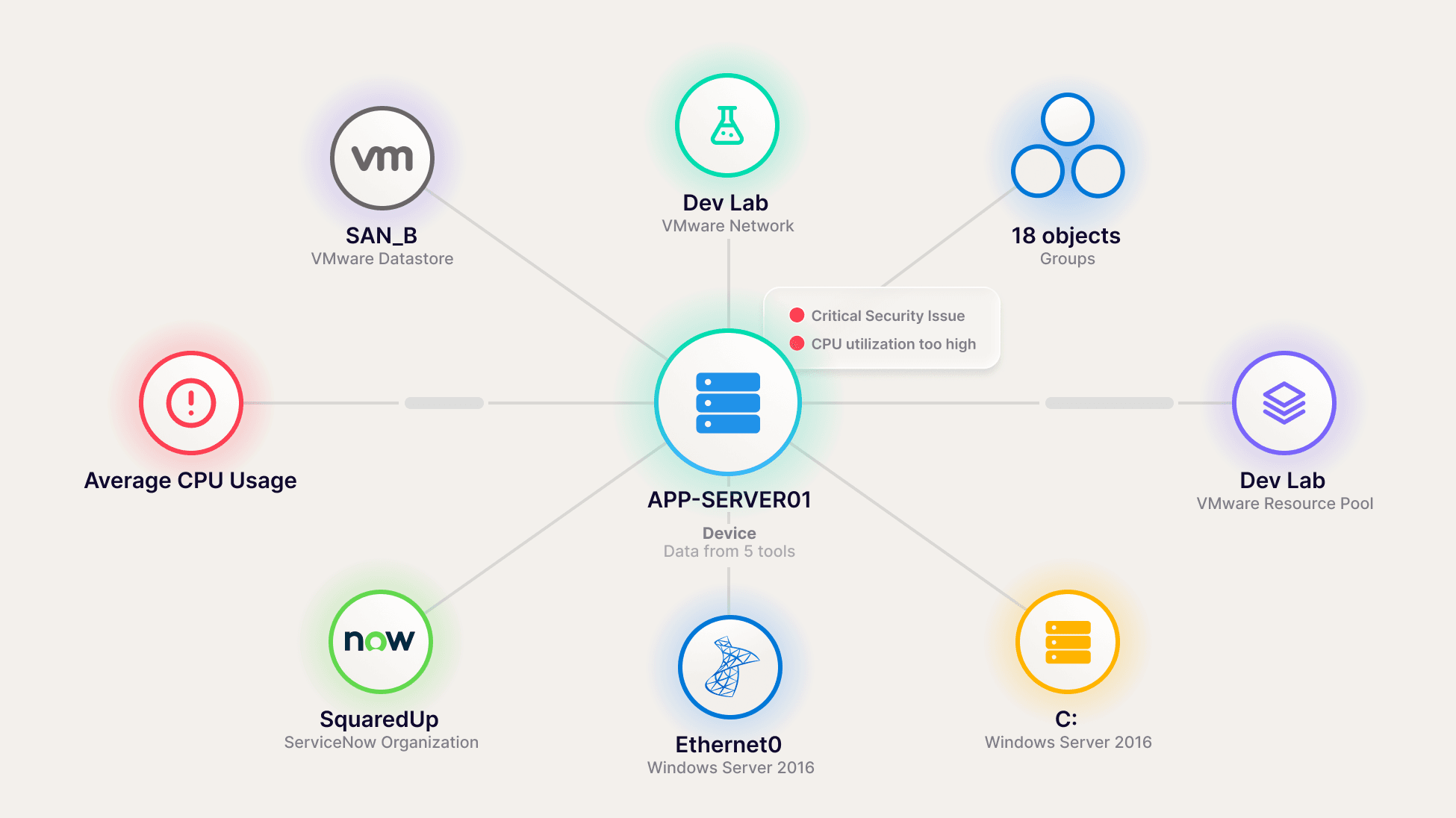
A single server can appear in several tools, each showing a different part of the picture. SCOM monitors its health, ServiceNow tracks its incidents and changes, Defender reports security alerts, and VMware holds its virtual machine details.
Correlation connects these different representations of the same server, so you can see the information from these systems together.
In SquaredUp, I can search for a computer name and find its related information across these tools without having to search each one separately.
If you prefer watching, there’s a video walkthrough at the end of this post.
When I search for the computer name in SquaredUp, I can see the server and the information related to it.
I can also find dashboards associated with the server. The security team may have built one, the ITSM team another, and the Azure team its own view. I might not have known these dashboards existed, but I can discover them through the server they're connected to.

I open the server troubleshooting dashboard, which brings together the information I'd normally collect by moving between systems.

With this information in one place, I can start investigating without having to switch between tools to find each detail.
Say the performance data shows CPU spiking repeatedly, while memory usage has climbed and stayed high.
ServiceNow also shows that a code optimisation patch was deployed recently. It's tempting to assume the patch caused the problem, but a recent change is a lead, not proof.
I'd compare the timings. When was the patch deployed? When did CPU usage start rising? Did memory usage change around the same time?
If the timings match, I have a lead to investigate with the team that deployed the change. If they don't, I can look elsewhere rather than waste time blaming the wrong team.
If Defender also shows an alert for the server, that's another lead to investigate.
I'm still doing the troubleshooting myself. Correlation doesn't tell me what caused the problem. It helps me find the relevant information so I can investigate without spending so much time searching for it.
I didn't build this dashboard for just one server. It uses a dashboard variable, so I can select another server from a dropdown and the dashboard updates to show its performance data, incidents, and alerts.
The layout stays the same, so I don't have to build a separate dashboard for every server. This helps in a few ways:
Squaredup also shows the Map for the server. It shows how the server connects to everything around it.

If the patch timing doesn't match the start of the CPU problem, I can look beyond the server itself. Another VM on the same host might be consuming most of the available CPU and memory, leaving less for the others.
The problem could be on a neighbouring VM, not the server I'm investigating. Seeing that relationship gives me another place to look without having to start a separate investigation from scratch.
The same approach works with other objects, too. You could start with a Kubernetes node and explore its pods and underlying cloud infrastructure, or look at a service alongside the cloud resources it depends on. You could also connect customer information across Zendesk and Salesforce, or link pipelines to the applications they deploy.
The starting point changes, but the idea stays the same: find the object and see the related information across your tools.
Obviously you want to be the one who finds the cause before the bridge call even starts, so get started. Connect the tools your servers already live in, like SCOM, Azure Arc, ServiceNow, Defender and VMware. SquaredUp links them together, so when you search for a computer name you’ll see its health, incidents, recent changes, security alerts and host in one place.
Then build one troubleshooting dashboard with a server variable. It works for every server you look after, including the ones you haven’t added yet.
I spent a lot of on-call nights raising tickets and paging other teams just to find out what was going on. If this saves someone else a few of those nights, I’ll call that a win. Start with one server, follow the evidence, and see where it takes you.
DevRel Engineer