Top 3 Jira reporting tools: SquaredUp vs Power BI vs Jira
Is Jira reporting creating a bottleneck in your team?
Louise Berry
SquaredUp
A recent survey revealed that developers and engineering teams waste 8+ hours a week on inefficiencies in their role. Poor reporting tools are a main contributor, with Jira being regarded as a frequent source of friction. But since Jira is so deeply embedded in most organizations' infrastructure and processes, replacing it is not really an option. Rather, the solution lies in optimizing how users interact with it rather than abandoning it altogether.
Out on the market, there are a number of software products that address Jira’s common pain points directly, offering intuitive interfaces and automated reporting that keep teams focused on their tasks rather than admin. We took the top three: SquaredUp, Jira’s native reporting tool, and Power BI, and put them to the test. Here’s a quick summary before we deep dive into all three:
SquaredUp: A unified dashboard platform that transforms complex IT and business data into intuitive, real-time visualizations without requiring technical expertise to set up or maintain.
Jira native tool: Jira has handy built-in reporting features that provide basic project insights, but these often require significant customization and technical know-how to generate meaningful, stakeholder-ready reports.
Power BI: Microsoft's robust business intelligence suite that offers powerful analytics capabilities, though it typically demands dedicated BI expertise and can overwhelm teams looking for straightforward operational dashboards.
SquaredUp
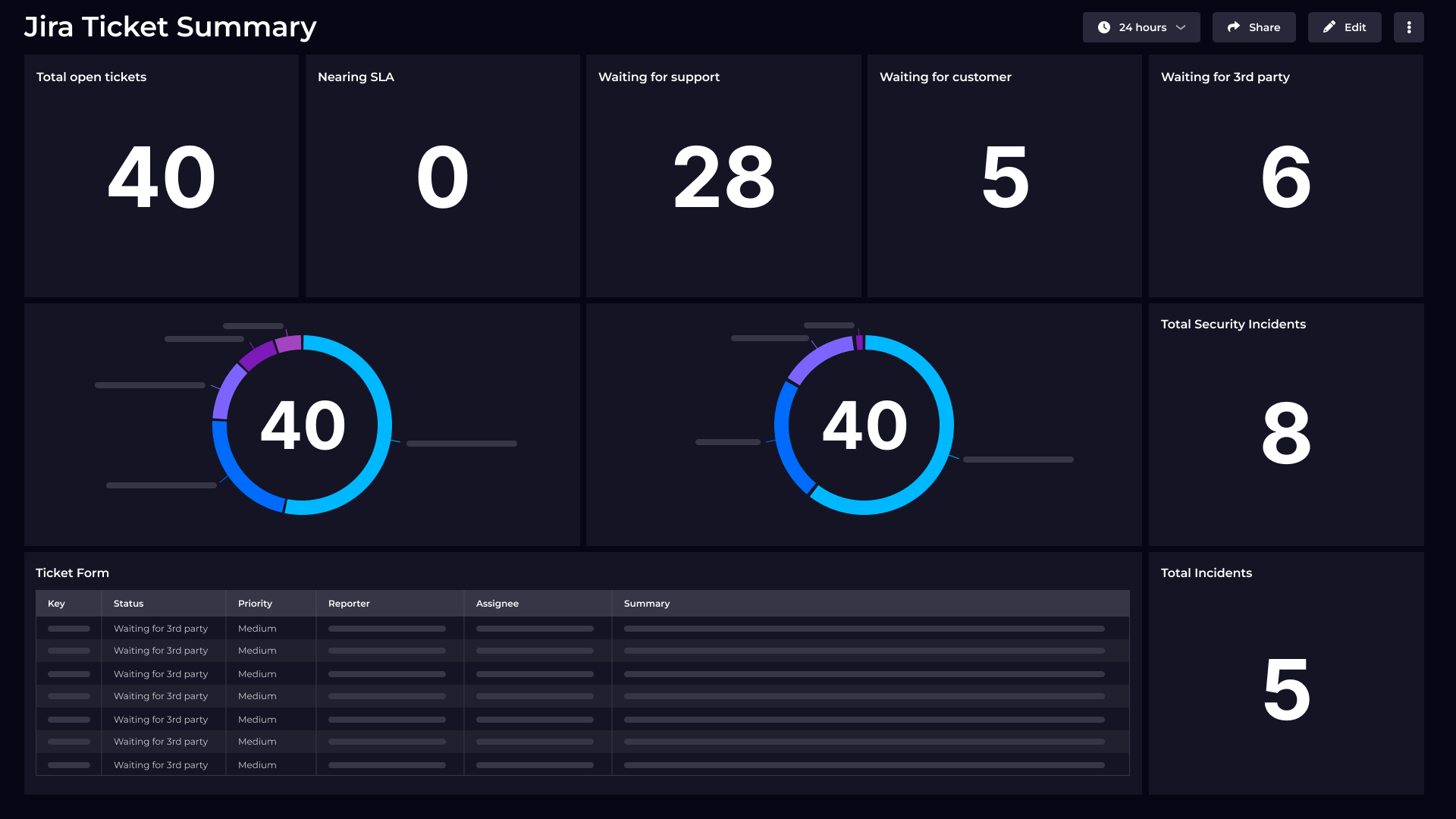
SquaredUp stands out for blending ease of use with the ability to build flexible, real-time dashboards that unify Jira data with dozens of other engineering and business platforms. Its intuitive interface empowers technical and non-technical users to design dashboards without coding, while robust integration options eliminate data silos. Pre-built templates, real-time visualizations, and rapid deployment mean teams can start gaining insights in minutes rather than weeks.
Key features
Rapid setup: Easily connect Jira and over 70 platforms—get dashboards live in minutes with pre-built plugins and intuitive configuration.
Unified data views: Aggregate data from Jira, GitHub, Azure DevOps, cloud services, APM, and more, producing one holistic picture of project health.
Real-time monitoring: Turn dashboard tiles into live monitors, set up notifications (email, Slack, Teams, webhook), and track KPIs across systems.
Powerful sharing: Share dashboards instantly organization-wide with public links, scheduled reports, and export options for Excel, Sheets, and Notion.
Extensible: Connect additional data using APIs, PowerShell, or JavaScript for advanced reporting and automation scenarios.
Limitations
Integration dependency: Relies entirely on the integrity and availability of source systems—missing or delayed data at the source limits dashboard accuracy.
Analytics depth: While custom dashboards are rich, advanced statistical modeling and deep BI analysis are not as extensive as dedicated BI platforms like Power BI.
Scope: Best suited for teams focusing on operational transparency and cross-tool insights—less tailored for business-wide, complex analytics needs.
Unified, real-time insights: Instantly connect Jira, CI/CD, cloud, APM, and more – no need for complex data lakes or BI pipelines.
Purpose-built visualizations: Engage the whole team with modern, interactive dashboards that drive meaningful action.
Balanced power and simplicity: IT, engineering, and business stakeholders all benefit, without the steep learning curve that plagues many BI tools.
Jira’s built-in dashboards and reports are the foundation for agile project visibility, offering instant updates on stories, bugs, tasks, and releases. Native reporting excels at keeping project teams up to date on their progress without any extra setup.
Key features
Ready-to-use dashboards: Standard options like sprint burndown, velocity, and release tracking – all available out of the box.
Project-centric tracking: Issue-level status, epic and sprint reporting, historical trends tailored for agile workflows.
Accessibility: Directly embedded in the Jira ecosystem, easy for all users from day one.
Basic integration: Supports simple connections to time tracking, CI/CD, and select Atlassian plugins for limited cross-tool reporting.
Limitations
Limited customization: Customizations are constrained – advanced reports require additional plugins or scripting, which can raise cost and complexity.
Lack of unified data: Dashboards focus only on Jira data and do not natively aggregate metrics from other development or business platforms.
Visualization options: Chart types and interactivity are more limited compared to modern dashboard platforms.
Scaling: As reporting needs expand, native Jira dashboards may fall short in surfacing actionable insights from complex environments or multiple teams.
Power BI
Jira reporting via Power BI. Image courtesy of Microsoft
Power BI is a leading business intelligence platform from Microsoft, renowned for its advanced analytics, visualization flexibility, and enterprise-grade data integration. Increasingly, teams use Power BI to build comprehensive dashboards and custom reports by connecting Jira data with other organizational systems.
Key features
Advanced analytics: Create sophisticated dashboards, custom reports, and in-depth visualizations with drag-and-drop and DAX formula capabilities.
Data integration: Seamlessly import Jira data via connectors or REST API and augment it with information from Microsoft 365, SQL Server, cloud platforms, and thousands of other sources.
Customization options: Full control over report formats, data transformations, and chart types; use AI-driven features like Copilot to surface insights faster.
Collaboration tools: Share dashboards across Microsoft Teams, OneDrive, and organizational groups; automate report distribution through scheduled refreshes.
Template gallery: Access and modify pre-built dashboard templates for Jira for quicker onboarding.
Enterprise scalability: Designed for complex and large-scale reporting environments, supporting extensive datasets and security policies.
Limitations
Setup complexity: Connecting Jira to Power BI, especially for continuous synchronization, usually requires add-ons or technical know-how; basic users may struggle with initial configuration.
Refresh delays: Data is typically refreshed on a schedule, not live – meaning operational metrics may lag real-world changes.
Steep learning curve: Building and customizing complex dashboards demands technical skill in Power BI’s query language and modeling concepts.
Cost: Enterprise-level features and external connectors may require costly licensing or third-party add-ons.
Fragmented experience: While powerful for analytics, Power BI isn’t tailored specifically for agile or DevOps reporting workflows, requiring additional work to shape Jira data for these purposes.
Deep integration with Microsoft Teams, PowerPoint, Azure
Real-time monitoring
Near real-time alerts and flexible notification rules
Relies on Jira workflow updates
Scheduled refresh; not always instant
Community & support
Active expert community; high satisfaction (97.8%)
Atlassian ecosystem; moderate support
Large global user base; Microsoft support
Deployment & costs
No data migration; pay for insights only; scalable
Included with Jira; costs for add-ons
Standalone license; pro costs, integrations
To wrap up, SquaredUp is hands down the go-to tool for Jira reporting if you want something that’s easy to use, quick to set up, and genuinely helpful every day. It pulls together your Jira info and data from all sorts of other tools into simple, clean dashboards that anyone on the team can understand and act on. No need for complicated setups or being a data whiz to get meaningful insights.
Compared to Jira’s built-in reports, which are useful but pretty basic, and Power BI, which is incredibly powerful but can be tough to master, SquaredUp strikes the perfect balance. It gives you real-time views, rich visuals, and seamless sharing without any steep learning curve.
So, if you want your Jira reports to actually help your team move faster and make smarter decisions – without the usual headaches – SquaredUp is where to start.
SquaredUp’s smarter dashboards help engineering, product, and IT teams make better decisions through a deeper understanding of their data. We have a completely free tier available for you to use today.Sign up for free now!
Frequently asked questions
SquaredUp provides native integration with both Jira Cloud and Jira Service Management through dedicated plugins that connect directly to your Atlassian environment using API tokens.
The platform supports scoped API tokens for enhanced security and can pull data from multiple Jira instances simultaneously. This integration allows you to combine Jira data with other data sources and use JQL (Jira Query Language) to customize metrics, giving you flexibility to create comprehensive dashboards that go beyond what's possible with native Jira reporting
SquaredUp offers various pre-built templates, including bug backlog trends (showing daily increase/decrease of open bugs), priority tables for newly raised issues, and DORA metrics like MTTR (Mean Time to Recover) using JQL filtering. You can create dashboards covering everything from release overviews to bug tracking, story progress, and high-level ticket summaries with SLA breach monitoring. The platform supports multiple visualization types, including line graphs, tables, and health indicators, with color-coded status dots for quick issue identification.
Yes, SquaredUp fully supports JQL customization, allowing you to use custom queries to create tailored metrics and filter data according to your specific requirements. For example, you can edit JQL queries to focus on the highest priority incidents for calculating DORA metrics or create custom filters for bug tracking based on priority levels. This JQL support means you can leverage all of Jira's powerful query capabilities within SquaredUp's visualization framework.
SquaredUp goes beyond native Jira reporting by offering out-of-the-box integrations with 60+ other tools, allowing you to aggregate project data from multiple sources into unified dashboards.
While Jira's native dashboards are limited to Jira data alone, SquaredUp enables you to combine Jira metrics with data from GitHub, Azure DevOps, AWS CloudWatch, and other tools in a single view.
This cross-platform capability provides a more comprehensive picture of your project health and development workflow.
SquaredUp integrates with both Jira Service Management and the legacy Jira Service Desk, enabling support teams to create instant overviews of ticket statuses and identify issues approaching SLA breaches.
The platform can visualize service desk metrics, incident tracking, and support queue management alongside your development project data, making it ideal for organizations running both development and service management workflows in their Atlassian environment.